


A scanner can display 100/100 while a menu remains unusable from the keyboard. It cannot always determine whether alternative text describes an image correctly, whether the reading order makes sense or whether an error message enables recovery.
Conversely, a single repeated automatic error on a thousand pages can produce an impressive volume but correct in a component.
The audit must therefore measure two things: sample compliance and the actual impact of the barriers. The first serves the regulatory evidence. The second guides the remediation.
1. Key figures: detectable errors remain massive in 2026
WebAIM analysed the home pages of one million sites in February 2026. 95.9% had at least an automatically detectable WCAG failure, compared to 94.8% in 2025. The absence of detected error does not prove compliance; the actual rate of fully compliant pages was necessarily below 4.1% under this limit.
The study detected 56,114,377 errors, or 56.1 per page on average and +10.1% per cent on one year. Pages had an average of 1,437 items, +22.5% in one year and almost twice the level of 2019. Complexity increases the control area.
Six types accounted for 96% of the errors detected: insufficient contrast, missing image alternatives, missing field labels, empty links, empty buttons and missing document language. The low contrast appeared on 83.9% of the pages, missing alternatives on 53.1% and missing labels on 51%.
Of the 66.6 million images analysed, 16.2% lacked alternative, excluding alt="". 10.8% of the images with alternative had dubious or repetitive text. More than one in four had a missing, questionable or repetitive alternative according to the analysis.
These figures describe international home pages and a given tool. A direct comparison with the RGAA of your site would be invalid. The results prove above all that the automated controls are not yet acquired.
The legal context has been strengthened. The European Accessibility Act came into effect on 28 June 2025 in the European Union for covered products and services, including electronic communications, banking, e-books, certain transport functions and e-commerce. AccessibleEU recalls that the Union has around 100 million disabled people among more than 440 million citizens.
2. Reference framework: RGAA, WCAG and legal obligations
Version 4.1.2 of the repository provides 106 criteria, tests and a methodology. It is organized into thirteen themes: images, frames, colours, multimedia, tables, links, scripts, mandatory elements, structuring, presentation, forms, navigation and consultation.
W3C WCAGs provide international principles and criteria: perceptible, usable, understandable and robust. RGAA operationalizes verification in the French context.
The legal scope depends on the body, the service, the dates and the applicable text. Public sector, companies covered by French law and services covered by the Accessibility Act may have separate obligations. A legal analysis confirms the framework.
The technical audit shall not invent the applicability. It shall document the product, the version of the repository, the level, the sample and the results. The legal statements, declaration of accessibility, multi-year scheme and action plan shall be examined when they apply.
3. Step 1 — Define the scope
The mission letter describes:
- domains, applications, languages and versions;
- authenticated and public interfaces;
- PDF documents and third-party content;
- technologies and browsers;
- reference and level;
- objective: compliance, pre-audit, follow-up or purchase;
- justified exclusions;
- access, accounts and test data;
- date and environment.
Third-party content does not disappear from the journey because the team does not develop them. Payment, appointment making, card, video and authentication are recorded. The report distinguishes responsibility and impact.
A mobile application may require appropriate methods and tests. The gestures, orientation, target size, mobile screen reader and external keyboard are included according to scope.
4. Step 2 — Explore the product
The W3C WCAG-EM structure the evaluation in five stages: define the scope, explore the product, select a representative sample, evaluate and report. Its update 2026 highlights the necessary expertise in standards, design/development, assistive technologies and uses of people with disabilities.
Exploring inventory templates, components, technologies, content, processes, roles and states. A crawler finds pages and variants. Analytics indicate frequent routes. Teams reveal critical functions and rare cases.
We're building a matrix:
| Dimension | Examples |
|---|---|
| Templates | home, list, sheet, article, form |
| Components | menu, modal, tab, carousel, autocomplete |
| Process | registration, purchase, payment, request, deletion |
| States | error, success, empty, loading, session expired |
| Contents | image, video, audio, tableau, PDF |
| Contexts | mobile, zoom, contrast, keyboard, screen reader |
Continuous exploration during the audit. A page may reveal an unidentified component.
5. Step 3: Build a representative sample
When each page cannot be audited, the sample combines structured and random selection in accordance with the WCAG-EM spirit.
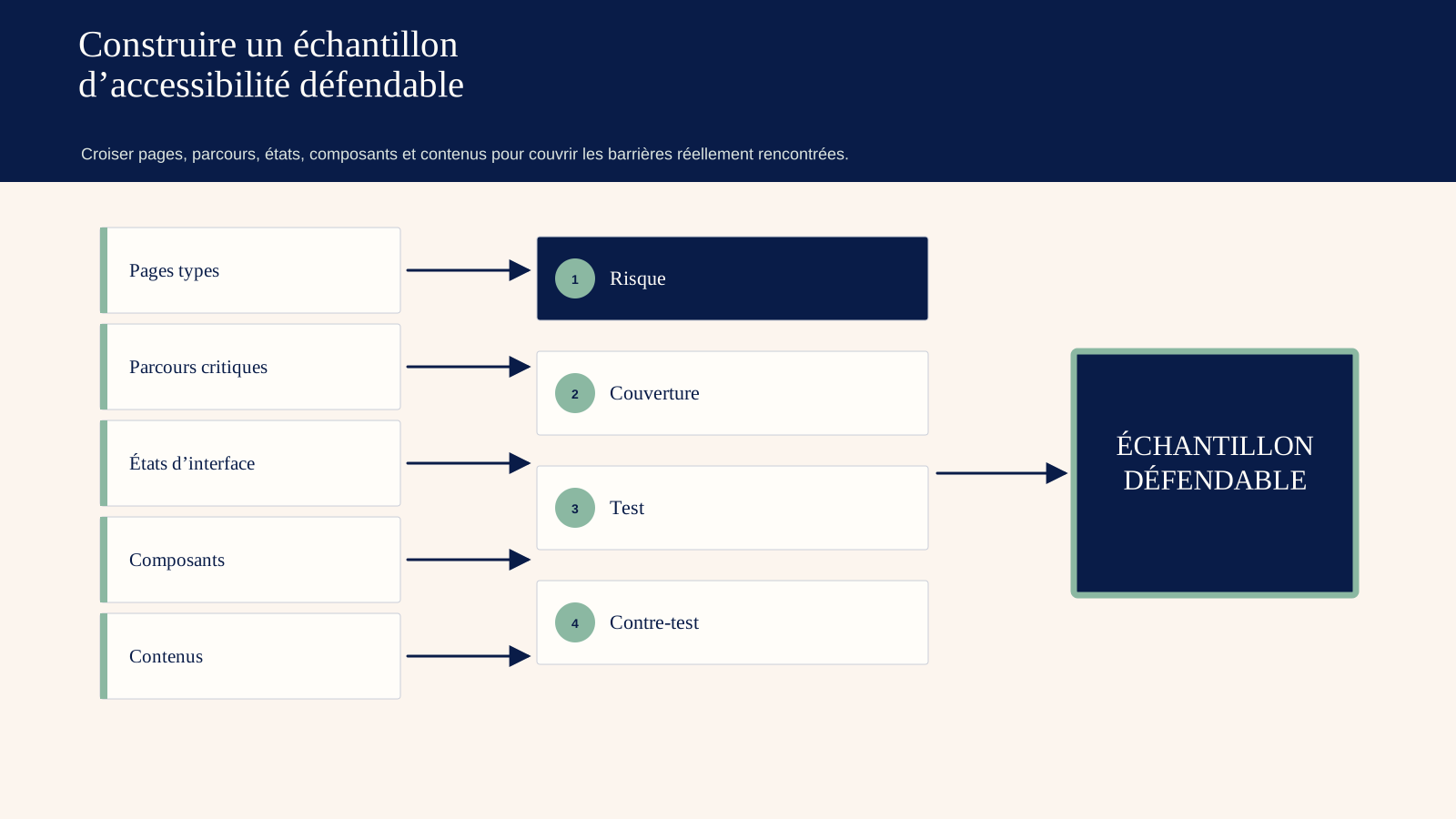
Structured selection includes:
- reception and higher level pages;
- each template;
- each essential technology;
- critical functions;
- pages with high traffic;
- sensitive or regulatory pages;
- documents and media;
- state of error;
- pages reported by users.
Complete processes are included. If a checkout page is selected, all necessary steps to purchase are tested. A page-by-page compliance is not enough if the process breaks.
A complete random selection to prevent the team from presenting only its best screens. The method, number and URLs are published.
Shared components are reported. A header defect affects the entire sample, but its correction can be centralized.
6. Step 4 — Prepare the test environment
For example: Windows with NVDA and Firefox/Chrome, macOS with VoiceOver and Safari, iOS with VoiceOver, Android with TalkBack, depending on usage and repository.
The versions are noted. No couple represents all users. The objective is a consistent coverage of supported technologies.
The settings include zoom 200% and 400%, text size, forced contrast, dark mode, motion reduction, orientation and flow. The keyboard is tested without mouse.
Automatic tools — axis, WAVE, Lighthouse or others — speed up screening. None of them pronounce compliance. The results are confirmed manually and deduplicated.
The test data avoid exposing real people. The destructive actions are carried out in a controlled environment.
7. Step 5 — Test the thirteen themes
7.1. Images
Each informative image has a relevant alternative. A decorative image is ignored correctly. A complex image has a suitable description. The test judges the meaning in the context, what an automata cannot conclude alone.
7.2. Frames
Frames have a title to identify their content. Integrations do not create keyboard traps or context breaks.
7.3. Colour
The information does not depend solely on the colour. Text/bottom contrasts, components and states are measured. Variations over, focus, error and deactivation are included.
7.4. Multimedia
The videos have subtitles, transcription and audio description or alternative as needed. The player is controllable on the keyboard, its named buttons and controlled autoplay.
7.5. Tables
Data tables have titles, headers and associations. They are not used for layout. Complex tables are simplified or properly linked.
7.6. Links
The title and context allow you to understand the destination. Image links have a name. New windows are marked when necessary.
7.7. Scripts
Interactive components have roles, names, values and states. Dynamic messages are announced. Focus is managed in modals, menus, tabs and applications.
7.8. Mandatory elements
Page title, language, language change, validity and structuring tags are checked. The title must distinguish the step or error.
7.9. Page structure
Headings reflect the hierarchy. Lists, citations and Landmarks use semantics. The DOM order corresponds to a logical reading.
7.10. Presentation
Content remains available without CSS when the test requires, focus is visible, zoom and flow work, spacing can be changed, movement respected and hidden content correctly.
7.11. Forms
Each field has a label, groups are identified, instructions arrive before need, errors are described and linked, autocompletion applies and correction is possible. Mandatory fields are reported otherwise than by colour.
7.12. Navigation
There are ways to avoid blocks, find pages and maintain a consistent order. The keyboard accesses everything without a trap. The plan and search are evaluated according to the product.
7.13. Content consultation
Time limits are controllable, window openings controlled, accessible documents, avoided flashing content and complex gestures have alternatives.
8. Step 6 — Test representative journeys with people
The W3C recommends involving users with disabilities to understand the real experience. User tests do not replace the compliance audit; they reveal impact, strategies and priorities.
Recruitment covers several profiles depending on the product: blind screen reader, visually impaired zoom, keyboard mobility or voice control, deafness, cognitive impairment, dyslexia. A person does not represent a whole disability.
The tasks are realistic: find a service, compare, create an account, correct an error, pay, download a document, contact assistance. The team observes success, time, assistance, errors and verbatims.
Participation is remunerated, requested access adjustments and data minimised. The testing environment itself must be accessible.
A non-compliance may not be visible in this small panel. A major barrier observed by a person remains important even without statistical frequency.
9. Calculate compliance without masking barriers
The RGAA defines the applicable method of calculation. The report publishes the criteria that comply with, do not comply with, do not apply and are not tested, with justification.
An overall percentage is not enough. Two 80% sites may differ: one has repeated contrasts, the other completely prevents payment on the keyboard.
Logiks adds an impact score, separated from compliance.
Blocking. Unable to complete a process without assistance.
Major. High difficulty, error or significant loss of information.
Moderate. Contouring possible with significant effort.
Minor. Limited or incoherence.
The impact takes into account the number of pages, the route, the frequency and the profiles, and does not change the regulatory result.
Each finding cites criteria, page, component, step, technology, reproduction, capture, useful code and proposal. The evidence allows the developer to verify.
10. Analyse root causes
The defects are grouped by origin.
Design system. Contrasts, focus, components, states and tokens.
Technical library. Modal, select, date picker or routing.
CMS. Alternative fields, heads, tables, editor.
Content. texts, media, documents and language.
Process. validation, timelines, support and third parties.
Governance. lack of acceptance criteria, competence or test.
Correcting an occurrence without the component creates relapses. The audit estimates the scope: number of templates, content and teams.
The backlog distinguishes immediate correction, component redesign, content migration and provider debt.
11. Prioritise remediation
The order combines user blocking, obligation, frequency, range, dependency and effort.
48 hours. Dangerous content, impossible payment or contact, trapped focus, media without essential information, manifestly false statement.
30 days. Navigation, critical forms, global contrasts, accessible names, structure and priority documents.
90 days. Design system, complex components, CMS, templates and test automation.
12 months. Resumption of archives, suppliers, training, governance and continuous improvement.
Each ticket has acceptance criteria and retest. "Add ARIA" is not a generic solution. Native HTML is often more robust.
Corrections are tested with keyboard, automatic tool and relevant support technology. A focus change can solve one criterion and break another.
12. Integrate accessibility into the product cycle
One-off remediation is not enough. The pipeline adds:
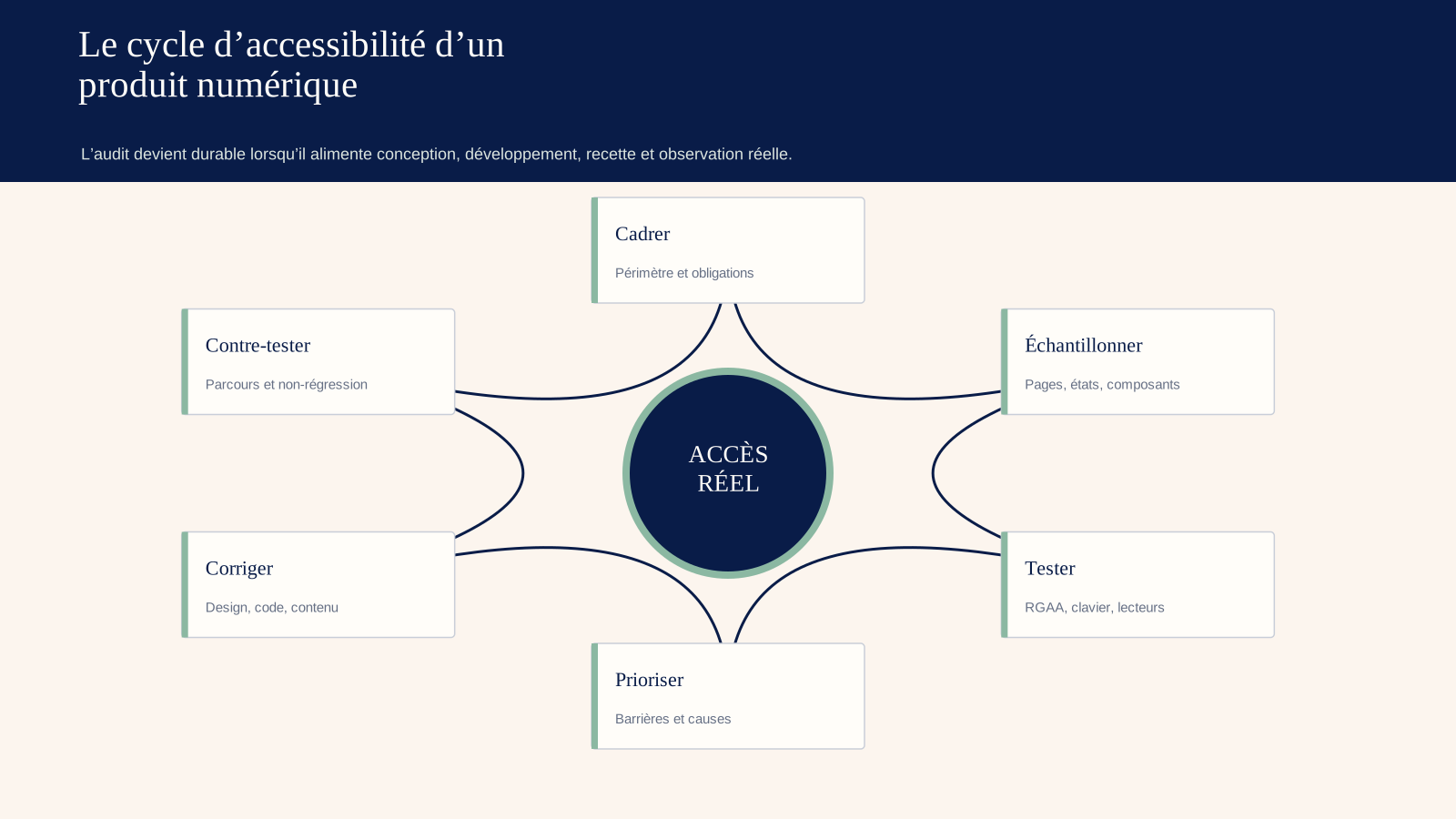
- accessibility criteria in user stories;
- design review before development;
- accessible components documented;
- Linting and automatic testing;
- Keyboard and screen-reader checks in acceptance testing;
- control of CMS content;
- supplier clause;
- periodic manual review;
- accessible reporting channel.
Automatic tests block regressions that they can detect: absent label, static contrast, invalid role. They do not replace full navigation.
The definition of done includes zoom, focus, error, name and semantics. Teams receive examples related to their role.
The accessibility manager follows the roadmap. He is not the only one to correct.
13. Case study: an automated score of 96/100, yet checkout was impossible
A merchant site displays 96 on the automatic audit. The keyboard test shows that the relay point selector cannot be opened. The screen reader does not hear card errors. The session expires without warning.
The sample includes the entire process. Three automatic criteria are in default, but nine manual failures affect the checkout. The overall rate remains high; the impact is blocking.
The main cause is a component library. The team replaces the select with a compliant combobox, connects the errors, announces the update and adds a session extension.
The tests cover NVDA, VoiceOver, keyboard and mobile. Two users then complete the purchase. The component joins the design system and a regression test.
The statement is updated after retesting, not before.
14. Deliverables expected
- scope, repository and technology;
- exploration and justified sample;
- table of 106 applicable criteria;
- evidence and reproduction;
- compliance rate and separate impact;
- Map of root and component causes;
- prioritised backlog with acceptance criteria;
- Retesting of corrections;
- assistance in the declaration of accessibility according to framework;
- Governance plan, training and ongoing testing.
The deliverable itself is accessible: structure, tables, contrasts, alternatives and usable format.
15. Frequently Asked Questions
15.1. Does a Lighthouse score prove RGAA compliance?
No. It covers an automated part on a page. The RGAA requires manual testing, a sample, processes and methodology.
15.2. How many pages do you need to audit?
Enough to represent full templates, technologies, content, functions and pathways, plus a random share. The number depends on the product. The method is more important than a fixed quota.
15.3. Can 100% be declared with non-compliant third-party content?
The answer depends on the scope and applicable rules. Exclusions must be justified, but the user impact must still be addressed with the supplier or through an alternative. Legal counsel should confirm the statement.
15.4. Are user tests replacing RGAA?
No. They complement compliance by showing experience. A person can succeed despite a failure, or encounter a barrier not covered by a tool.
15.5. When will the audit be repeated?
After major overhaul or change, then depending on the legal cycle and the risk. Annual control and continuous testing reduce regressions.
16. What the keyboard can prove against non-compliant components
The correction is done first at the most reused level. A field corrected in the design system can solve dozens of occurrences; a local overload leaves the cause active.
The ticket indicates criteria, page, component, reproduction step, impact, relevant code and expected result. A screenshot alone does not document the focus or the screen reader's announcement.
After delivery, a different person repeats the test with the same environment, then on several occurrences. It also checks regressions: order, zoom, flow, accessible name, messages, contrast and status.
When a selection component is announced as corrected, the acceptance testing must show that it can be reached, opened, browse its options, know the selection, validate, cancel, return to the trigger, understand the errors and complete the journey with a screen reader on the selected combinations; this sequence is worth more than an added attribute, as it checks the entire interaction and not just the presence of a role.
The non-applicable criteria are justified. Any derogations follow the legal framework and do not become a category of comfort. Third-party content remains identified, with responsibility and alternative where necessary.
The prevention plan adds automated tests, editorial checklist, design review and human sample. Automation blocks known errors; manual control retains meaning.
At the next audit, the team compares recurrence by component, seniority, severity and course. A one-off increase may come from a wider scope; the report explains the denominator rather than celebrating or dramatizing an isolated score.
For each critical correction, the closure pack includes the evidence captured before the fix, the version, the retest, the technologies used and the remaining limits, then a person who did not produce the patch repeats the complete journey; this slight independence reduces the risk that a developer will confirm his or her own change using only the case they know, while another occurrence, language or state of error still prevents completion.
The evidence remains dated and reproducible.
17. What Logiks recommends
Define the sample before calculating a score, include the complete processes and confirm the tools by manual tests. Prioritise by impact, correct the shared root components and retest. Accessibility is not proven by the absence of alerts: it is demonstrated by the ability of different people to perform the same actions.
18. Main sources
- DINUM, RGAA 4.1.2, 106 criteria and technical method: https://accessibilite.numerique.gouv.fr/
- DINUM, RGAA PDF 4.1.2: https://accessibilite.numerique.gouv.fr/doc/RGAA-v4.1.2.pdf
- W3C WAI, WCAG-EM Overview, updated February 2026: https://www.w3.org/WAI/test-evaluate/conformance/wcag-em/
- W3C, WCAG-EM 2.0 : https://www.w3.org/TR/wcag-em-2/
- WebAIM, The WebAIM Million 2026 : https://webaim.org/projects/million/
- European Commission, implementation of the European Accessibility Act: https://digital-strategy.ec.europa.eu/en/news/eu-becomes-more-accessible-all
- AccessibleEU, EAA and covered services: https://accessible-eu-centre.ec.europa.eu/content-corner/news/new-era-inclusion-begins-eaa-enters-force-2025-06-27_en